

How To Program Nissan Key Fob? - Okey DoKey Locksmith
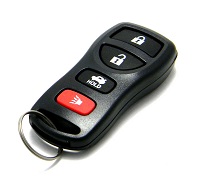 A Nissan remote provides convenient control of features such as locking and unlocking the doors, opening the trunk on compatible vehicles, and activating the panic alarm. Although the terms are often used interchangeably, the remote-control portion of a Nissan key is not necessarily the same thing as the transponder or smart-key system that authorizes the vehicle to start.
If you have purchased another remote or an existing remote has stopped communicating with the vehicle, it may need to be programmed. Some older Nissan vehicles support an on-board remote programming procedure, while many newer Nissan vehicles and Intelligent Key systems require a different process.
This guide covers the common on-board procedure used by certain Nissan models equipped with a traditional ignition key and compatible keyless-entry remote. It does not apply universally to every Nissan year, model, or key fob.
Contents
Nissan Remote Programming vs. Key Programming
Before starting, it is important to distinguish between remote programming and vehicle-start authorization. The buttons on a remote communicate with the vehicle's keyless-entry system to operate features such as the door locks and trunk.
A Nissan key may also contain a transponder or be part of an Intelligent Key system used by the vehicle's immobilizer. Programming the remote buttons does not necessarily program the electronic component required to start the engine.
Likewise, changing a remote battery normally does not mean that you are adding a new remote to the vehicle. If the remote stops working immediately after a battery change, first verify the battery type, orientation, and contacts before assuming programming has been lost.
Before You Start
The procedure below applies only to Nissan vehicles that support this particular on-board remote programming mode. Nissan has used many different keyless-entry and immobilizer systems, so do not assume the procedure is identical for every Altima, Maxima, Pathfinder, Rogue, Titan, or other Nissan model.
Before beginning:
- Make sure you have a functional ignition key.
- Have all compatible remotes you want to add with you.
- Verify that the remote is compatible with your Nissan's year and keyless-entry system.
- Check that each remote has a good battery.
- Remember that this procedure concerns the remote-control functions, not immobilizer or transponder-key programming.
If you need another compatible remote, you can review options for purchasing keys and remotes online before beginning.
How to Program a Nissan Remote
For Nissan vehicles that support the older on-board programming procedure, the general sequence is as follows:
-
Enter the vehicle with your key and remotes.
Have the functional ignition key and every compatible remote you intend to program inside the vehicle before starting.
-
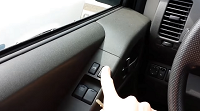 Lock the doors. Sit in the driver's seat and use the driver's-side power door-lock switch to lock the doors.
 -
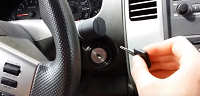 Insert and remove the ignition key. Insert and remove the key from the ignition repeatedly without turning it. On compatible Nissan systems, this sequence is used to request entry into remote-programming mode.
 -
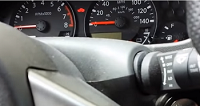 Watch the hazard lights. When the vehicle recognizes the programming sequence, the hazard lights should flash to indicate that programming mode has been entered.
 -
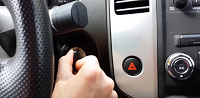 Turn the ignition key to ACC. Insert the key again and turn it to the ACC or accessory position without starting the engine.
 -
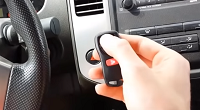 Press the remote button. Press the Lock button on the compatible remote. On vehicles that use this procedure, the hazard lights should respond to indicate that the remote has been accepted.
 -
Finish the programming session. After all intended remotes have been addressed, turn the ignition off and remove the key. Test each remote to confirm that the Lock and Unlock buttons operate correctly.
Programming Additional Nissan Remotes
If your Nissan supports on-board programming and you want to add more than one remote, have all of the remotes present before beginning. The exact sequence for adding additional remotes can vary by Nissan system.
After programming, test every remote rather than assuming they were all accepted. Confirm the Lock and Unlock functions and, where applicable, the trunk-release and panic buttons.
What If Nissan Remote Programming Doesn't Work?
If the hazard lights never indicate programming mode or the vehicle does not respond to the remote, do not continue repeating the procedure indefinitely. The vehicle may use a different keyless-entry system or may not support owner on-board programming.
Other possible causes include an incompatible remote, weak remote battery, damaged remote electronics, a problem with the vehicle's receiver, or a Nissan system that requires diagnostic equipment.
Compatibility is particularly important when purchasing a replacement. Two Nissan remotes can look almost identical while using different electronics. Matching the remote to the vehicle may require checking the year, model, original remote information, and applicable part or FCC identification.
If the key itself has been lost rather than merely the remote buttons failing, see our car key replacement information. A lost Nissan transponder key or Intelligent Key is a different situation from adding a keyless-entry remote.
What About Nissan Intelligent Keys?
Many newer Nissan vehicles use an Intelligent Key rather than the older separate key-and-remote arrangement. These systems can provide proximity-based functions such as unlocking the vehicle while the key is nearby and starting the vehicle with a push-button ignition.
Do not use an older Nissan remote-programming procedure as a universal method for an Intelligent Key. Depending on the vehicle, adding or replacing an Intelligent Key can require compatible equipment and a different programming process.
An automotive locksmith familiar with Nissan key systems can identify whether the vehicle uses a conventional remote, transponder key, remote-head key, or Intelligent Key and determine the appropriate replacement or programming method.
Nissan Remote Programming FAQ
Can every Nissan remote be programmed using the procedure above?
No. Nissan has used different keyless-entry systems across different models and years. The on-board procedure applies only to compatible vehicles.
Is programming a Nissan remote the same as programming a Nissan transponder key?
No. Remote programming concerns functions such as Lock, Unlock, and trunk release. A transponder is associated with the vehicle's immobilizer and starting authorization. The two functions should not be treated as the same programming process.
Do I need to program my Nissan remote after changing its battery?
Normally, simply replacing the battery in an existing working remote should not create a new remote identity. If it stops working after battery replacement, check the battery orientation, contacts, and correct battery type first.
Why won't my Nissan enter remote-programming mode?
Your vehicle may not support that on-board procedure. The cause can also be related to the keyless-entry system, vehicle configuration, or the sequence not being recognized.
Can I buy a Nissan remote online and program it myself?
Possibly, depending on the Nissan model, year, remote type, and system. Confirm compatibility before purchasing because appearance alone does not establish that a remote will work with your vehicle.
Can this procedure program a Nissan Intelligent Key?
Do not assume so. Intelligent Keys use a different type of system from many older Nissan keyless-entry remotes, and replacement or programming requirements vary by vehicle.
What if I have lost every Nissan key?
An all-keys-lost situation requires more than programming the buttons on a remote. The correct replacement key must be identified and, where applicable, cut and electronically registered to the vehicle.
