

How to Replace Toyota Camry Remote Battery? - Okey DoKey Locksmith
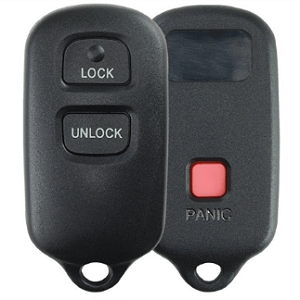 A weak or dead remote battery can cause the buttons on your Toyota remote to respond inconsistently or stop working altogether. Fortunately, replacing the battery is usually a simple job that can be completed in just a few minutes.
This guide explains how to replace a Toyota Camry remote battery using the remote design shown in the photos below. Similar Toyota remotes may be found on other models, but the remote design and required battery can vary by model year and key type.
Before purchasing a battery, open the remote or check its existing battery to confirm the correct battery number. The remote shown in this guide uses a CR2032 3V coin-cell battery.
Contents
Toyota Remote Battery Type
The Toyota remote shown in this guide uses a CR2032 3V battery. CR2032 batteries are widely available online and at stores that sell batteries and automotive accessories.
Do not assume that every Toyota remote uses a CR2032. Toyota has used different remotes, key fobs, and keyless-entry systems over the years. Check the number printed on your old battery before purchasing a replacement.
Tools You Will Need
The main tool needed for the remote shown here is a small flathead screwdriver. Use it carefully when separating the remote housing so you do not damage the plastic case or internal components.
You will need:
- A replacement CR2032 3V battery for the remote shown
- A small flathead screwdriver
- A clean work surface where small components will not be lost
1. Open the Toyota Remote
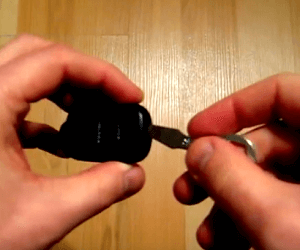 Locate the small notch in the remote housing near the top of the remote. Carefully insert the tip of the small flathead screwdriver into the notch and gently turn it to begin separating the two sections of the housing.
Avoid forcing the case apart. If the housing does not separate easily, check that you are using the intended opening point rather than prying against another part of the plastic case.
2. Remove the Old Battery
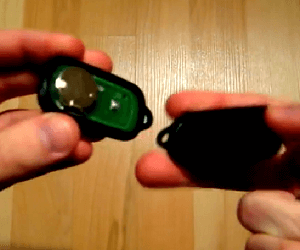 Once the remote housing is open, locate the battery inside the remote assembly. Carefully remove the old battery without damaging the battery contacts or surrounding components.
Before removing it completely, notice which side of the battery faces upward. Installing the replacement in the same orientation will help avoid confusion during reassembly.
3. Install the New CR2032 Battery
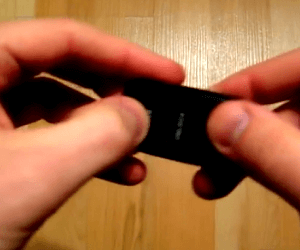 Install the new CR2032 battery in the same orientation as the battery you removed. For the remote shown in this guide, the positive (+) side faces upward.
Make sure the battery is seated properly and held securely by the battery contacts. Avoid bending the contacts while installing it.
4. Reassemble the Toyota Remote
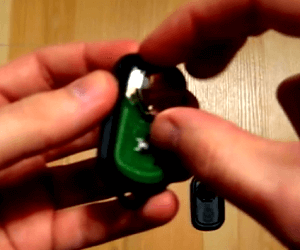 Check that the Lock and Unlock buttons are positioned correctly before closing the remote. The buttons should sit in their proper locations and move normally when pressed.
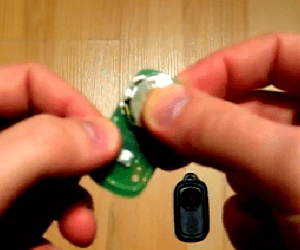 Position the internal remote assembly correctly inside the housing. Make sure the Panic button and other buttons line up with their openings in the case.
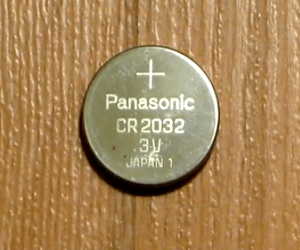 Align the two halves of the remote and gently press them together until the housing is completely closed. Reattach the key ring if it was removed.
5. Test the Toyota Remote
After closing the case, test the Lock, Unlock, and Panic buttons near the vehicle. Make sure the buttons move normally and that the vehicle responds to the remote.
Replacing a remote battery normally does not create a new key or change the electronic identity of the existing remote. If the remote worked before the battery became weak, replacing the battery should generally restore normal operation without replacing the entire key.
You can also view the original Toyota remote battery replacement resource by following this link.
What If the Toyota Remote Still Doesn't Work?
If the remote does not work after installing the new battery, reopen it and check the battery orientation and make sure the battery is seated securely. Also inspect the case to make sure the buttons and internal components were positioned correctly during reassembly.
If another working remote is available, comparing the two can help determine whether the problem is limited to one remote or may involve the vehicle.
A remote can also fail for reasons unrelated to the battery. Worn buttons, damaged internal electronics, water damage, broken battery contacts, or another remote problem may require repair or replacement.
If the complete key needs to be replaced rather than simply having its battery changed, see our Toyota key replacement information. Depending on the Toyota model and key type, replacement may involve a mechanical key, remote, transponder, or smart-key system.
If all of the vehicle's keys have been lost, a car key replacement service is different from simply changing a remote battery. An automotive locksmith can determine the appropriate replacement key for the vehicle.
Toyota Remote Battery FAQ
What battery does a Toyota Camry remote use?
The remote shown in this guide uses a CR2032 3V coin-cell battery. Toyota has used different remote designs, however, so check the battery already installed in your remote before purchasing a replacement.
Which side of the CR2032 battery faces up?
For the remote shown in this guide, the positive (+) side of the CR2032 battery faces upward. If your remote differs from the one pictured, note the orientation of the original battery before removing it.
Do I need to program my Toyota remote after changing the battery?
A routine battery replacement normally does not mean you are creating or adding a new remote. If the existing remote was already associated with the vehicle, replacing its battery generally does not by itself require programming a new key.
Why does my Toyota remote still not work with a new battery?
Check that the battery is installed in the correct direction and seated securely. If those are correct, the remote may have damaged contacts, worn buttons, damaged electronics, or another problem unrelated to the battery.
Can I use this procedure for other Toyota models?
Other Toyota vehicles may use a similar remote, but Toyota has used multiple key and remote designs across different models and years. Compare your remote with the one shown here and verify its battery type before following the procedure.
Is changing the remote battery the same as replacing a Toyota key?
No. Battery replacement restores power to an existing remote. Replacing a lost or damaged Toyota key can involve cutting a new key and, depending on the system, electronic programming.
